Archive for the ‘Zutubi’ Category

EclipseCon 2007

Thursday, February 1st, 2007

As Jason mentioned previously, we are in the process of introducing OSGi into the core of Pulse to handle our plugin support. Since OSGi is also the core of Eclipse, we decided to that a trip to EclipseCon 2007 would be a great way to introduce ourselves into the community and see how people are using OSGi.

It promises to be a very interesting trip, not least for the fact that both Jason and I use IDEA for our development. I have not used Eclipse for quite some time, and last time Jason tried, it killed his mouse. But just maybe it is time to give Eclipse another try? With its support for developing plugins, it will certainly help with developing extensions for Pulse.

If anyone is interested in catching up with us while we are state side, send us an email. We are looking forward to talking to Pulse users and a little madness readers alike.

The Perfect Programming Job

Thursday, February 1st, 2007

Fresh out of a Computer Science degree at uni, I hit the job market looking, naturally, for the best job I could find. I immediately ruled out moving into big business (think banking, insurance) and the consulting roles that tend to take you to such places. I wanted to work with technology I could enjoy, on new projects, churning out interesting “stuff”. That is what led me to the wonderful world of the VC-funded startup.

There are many great things about startups:

  1. New projects: by their very nature, startups have brand new projects to work on. We all know that starting from scratch is much more stimulating and fun than maintaining a 30-year-old COBOL codebase.
  2. Great people: because they have interesting projects and questionable job security, startups tend to attract people with a real interest in technology. You don’t get people who moved into “IT” as a career strategy, you get people who love what they do.
  3. Great atmosphere: partly because of 1. and 2., but also because of their small size and youth, startups often have a great feel. They haven’t had time to develop the painful politics and beuraucracy of older, larger companies. Hopefully they never will!
  4. No customers: when you’re just starting out, there are none of those annoying end-users to pester you with support questions and Real World problems. You can just code away in your own little world.

So I jumped aboard the VC-funded startup roller-coaster, and I had a great time. I lost my job a couple of times, but there were always new ventures to start on. I had a ton of fun and I learned heaps.

But something did start to bug me. I poured my efforts into these ventures and their projects, and even though the technology was fun, there was somewhat of a hollow feeling. The problem was that all of this effort was going to waste: without customers everything I created was consigned to obscurity. Of course the startups planned to get customers, and lots of them, but the business model was the classic boom-or-bust strategy. Either we would “disrupt” the world, or we would fade into oblivion. Of course, the odds lean heavily towards the latter.

So this supposed advantage of not having to worry about customers turned out to be the one great drawback of working for startup ventures. Jeff Atwood touches on it in his post Shipping Isn’t Enough:

How many users actually use your application? Now that’s the ultimate metric of success.

I achieved plenty in terms of development as a programmer, and I even managed to do some pretty good work (I hope!). But at the end of the day, I didn’t have the sense of achievement that only comes from creating something that other people use.

However, I have not given the startup game away :) . I realised that you can have all the advantages, just with a different strategy. So at Zutubi we’re not planning to “disrupt” anyone. We just make software that people love to use, and grow organically off the back of that. And for once, I have Real Customers that use my software, and I interact with them closely. Who would have thought it: I love dealing with customers! Not because they pay (though I thank them for that ;) ), but because every time I learn of someone new using our software, I get that sense of achievement I had been looking for.

Even while I wrote this entry, an email landed from a customer commenting on how they loved the user experience of Pulse. Honestly, it does not get any better than that!
Wiki Syntax for Your Commit Comments

Wednesday, January 24th, 2007

Pulse has strong SCM integration, which includes showing changelist information for changes between builds. For some time, Pulse has had the ability to transform the commit comments that it displays to insert links to external systems. For example, you could link the text “bug 123″ to the summary for that bug in your issue tracking software. This is neat, as you can jump straight from Pulse to any external tool you choose to link to.

As part of Pulse 1.2, we have beefed up this system. One of our customers wanted to be able to strip redundant information from their commit comments as shown in Pulse. This led us to adding the ability to transform commit comments in more general ways than just linking. Now, you can specify an arbitrary regular expression to match and corresponding replacement text. The cool thing is that this mechanism gives you the power to do all sorts of useful transformations on your commit messages. It soon occurred to me that one very useful thing to do would be to support a Wiki-like syntax for your commit messages! For example, you can add a transformer to render text in bold when surrounded by asterixes:

Expression: \*([\w ]+)\*
Replacement: <b>$1</b>

The text between the asterixes is captured into group 1, and the replacement wraps this group with <b> tags. Now when viewing changes in Pulse, important bits stand out:

Of course, we can go much further. Linking is a good thing, so why not support turning anything that looks like a link into one? And anything that looks like an email address into a mailto: link? Here it goes:

Expression: http://[\w./]+
Replacement: <a href=”$0″>$0</a>

Expression: [\w]+@[\w.]+
Replacement: <a href=”mailto:$0″>$0</a>

Now whenever someone references a useful URL, it is but a click away from the Pulse web UI:

We have really just scratched the surface here. The mechanism is flexible enough to do all sorts of weird, wonderful and (hopefully) useful things! Give Pulse a try and go nuts!

New in Pulse 1.2: Integration with Fisheye/Trac/ViewVC

Thursday, January 11th, 2007

A great new feature we have introduced into Pulse 1.2 is tighter integration with change viewers. We have added simpler configuration for common viewers such as Fisheye, Trac and ViewVC (formerly ViewCVS), with custom configuration also possible for other systems. We have also deepened the integration by adding more direct links from Pulse back to your change viewer.

Now, when viewing changelist information in Pulse, you can directly access further information in your change viewer:

  • The changelist itself can be viewed in the change viewer by clicking on the revision wherever it appears in the Pulse UI.
  • Download and/or view the contents of any file as it was at the revision
  • Jump directly to the diff view in your change viewer to see what changes were made to a file.

The shot below shows how these links are presented for each file:

This feature is simple but incredibly useful. Figuring out why a build is broken often boils down to seeing what has changed. With change viewer integration, this information is at your fingertips. There is no need to change context. Enjoy!

AJAX Goodness in Pulse 1.2

Thursday, December 14th, 2006

Pulse has always used a bit of AJAX (and plain old JavaScript) here and there to make the interface more responsive. For example, there are plenty of instances where you can test new configuration before you save it, without leaving the configuration form (a huge time saver when configuring!). We also try to avoid gratuitous use of AJAX, which seems to be popping up all over the place as the hype takes its toll. However, in Pulse 1.2 we found some key places to introduce AJAX to give users that warm and fuzzy feeling.

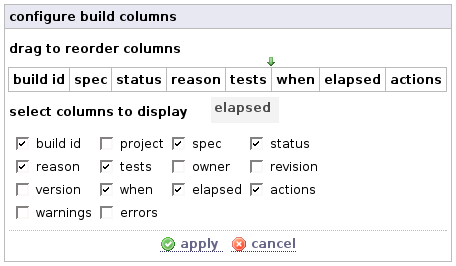
My personal favourite is a new widget to customise the columns in build results tables. These tables are used to summarise the most important build information throughout the Pulse UI. Over time, our customers have requested several new pieces of information to be shown in the tables. Adding them all for everyone would lead to information overload, not to mention the required screen real estate. The obvious solution was to make the table columns customisable. This is a prime case where a rich client-side UI is far more usable than a “click-refresh-click-refresh…” approach. The widget we came up with is simple: a bunch of checkboxes to choose the columns to show, and the ability to drag and drop the columns to reorder them:

Using it is a snap, and it just Feels Good. Everything happens client-side until you apply and the changes take effect by an AJAX-refresh of the underlying page.

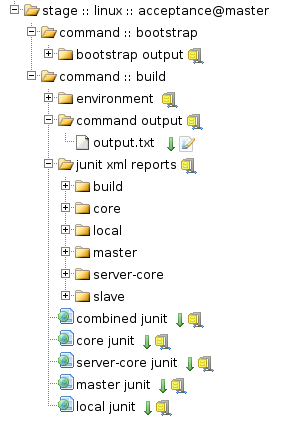
Another prime candidate for AJAXification was the views for browsing working copies and build artifacts. We already had a treeview in place for browsing directories (e.g. during the setup wizard), and with some work adapted it to these views:

I can not tell you how much faster it is to browse around using these views! The page only loads what is needed when you first hit it, and drilling down is much, much easier.

Pulse Continuous Integration Server 1.2 Goes Beta

Wednesday, December 13th, 2006

Well, we’re pretty pumped today. The latest major release of Pulse has gone beta today, and been promoted to zutubi.com! Many thanks to the customers who rode the bleeding edge of the Pulse 1.2 Early Access Program, your feedback has been invaluable. Now you have a kick arse build server in return :) .

Pulse 1.2 is packed with new features, and dozens of those little improvements that just Make Life Better. The list includes:

  • Personal Builds: The headline feature for 1.2, personal builds allow you to submit your changes directly to Pulse for testing before you commit them.
  • Reports: Each pulse project now has its own “reports” page, which displays build data for the project visually.
  • Change Viewers: easily integrate Pulse with change viewers such as Fisheye, P4Web, Trac and ViewVC. Use custom settings to integrate with other viewers.
  • Commit Message Transformers: control how your commit messages appear in Pulse. Link them to your bug tracker, or highlight important information.
  • Customisable Build Columns: choose the fields to view for build results, and reorder them using drag and drop!
  • AJAX-powered browsing: browse your working copies and captured artifacts using a dynamic tree view.
  • “Broken since” Support: when a test has been failing for multiple builds, it is displayed differently. The build where it first failed is just a click away!
  • Windows System Tray Notification: a new Windows client, “Stethoscope”, allows you to see your project status at a glance.
  • Customisable Notifications: you can now override the default notification messages (email or Jabber) by creating your own notification templates.
  • Automatic Agent Upgrades: when the Pulse master server is upgraded, it will automatically upgrade all agent servers.
  • Much, much more: dozens of other minor features and improvements.

I’ve talked a bit about personal builds, and how they combine with distributed builds to make Pulse a must-have development tool. I’ll also post about some of the other new features, and the cool things they let you do.

For now, check out Pulse at zutubi.com. Give it a try for 30 days for free: you’ll be hooked ;) .

Article: Reducing the Impact of Broken Builds

Tuesday, December 5th, 2006

The “build” is the current status of any software project, and as such reflects the health, vitality and progress of the project. In this article we first review some of the impacts of a broken build. Those already familiar with the negative impacts of broken builds may wish to skip this lead in. There follows an analysis of various techniques to reduce the frequency and impact of broken builds. These techniques vary from the optimistic to the preventative, and from lightweight to quite intensive.

Read the full article at zutubi.com.

Pulse Continuous Integration Server 1.2 M3

Tuesday, December 5th, 2006

We just keep on punching out the milestones on 1.2 ;) . New features in this puppy include:

  • Customisable columns: customise build tables with drag and drop.
  • Manual release support: configure Pulse to prompt for release build properties
  • Post stage actions: hook in after each agent build to cleanup/reboot agents.
  • P4Web support: built in linking to P4Web.
  • LDAP group integration: manage permissions through LDAP
  • Broken since support for tests: differentiate new and existing test failures.
  • Executable projects: run custom build scripts without dropping down to XML.

See the early access page for M3 packages and full details.

Get More Out Of Your Continuous Integration Server With Personal Builds

Friday, November 17th, 2006

The headline new feature in Pulse 1.2 is personal builds. A personal build is a build of the current state of your working copy on the Pulse server. This allows you to test your changes before you commit them to version control. The most obvious advantage of this is that you don’t have to taint your shared source base with untested code to get a CI build. You test first, then commit when you are happy. However, there are also some less obvious advantages:

  • Multiplatform testing: Pulse supports distributing a build across multiple agents in parallel. This allows you to easily test on multiple platforms. Couple this with personal builds, and you can easily test code on platforms other than your preferred development platform while you develop. No need to struggle with slow builds over a networked file system, or to manually move the code about to test.
  • More efficient resource usage: you can submit a personal build to your Pulse build farm and still have your development machine free for other tasks. You can also make use of free developer machines as Pulse agents, but that is for another post :) .
  • Full reporting: just like every other build, Pulse extracts and reports interesting information for personal builds via a rich web interface. This beats digging through hundreds of lines of build logs and scratching up test reports to find the relevant info. Pulse can also be configured to send you notifications when personal builds complete, just like a CI build. You can even customise both the information Pulse extracts from the logs and the format of the notification messages.
  • Build history: Pulse will remember your recent personal builds (as many as you choose) and keep the results available for browsing. This makes it possible to refer back to an earlier issue without scrolling frantically in your console buffer (if you’re lucky enough to have the output at all!).

Personal builds are just one way in which we are making Pulse do more than your regular continuous integration server. From the start, we have seen Pulse as not just a server that sits on the sideline, but as a tool that you can leverage during every day development. This is why we have a strong focus on the developer in Pulse: every developer has their own account with a configurable dashboard and very flexible notification settings. Adding personal builds to the mix expands on what you can do with Pulse as you develop, and it is just one of a suite of tools we have or plan to add to Pulse in the near future.

Anyhow, I hope I’ve piqued your interest in the idea. If so, check out the Early Access Page for Pulse 1.2, and enjoy!

Article: Automated Releases

Tuesday, November 14th, 2006

In this article, we look into automating the release process. We begin by reviewing the benefits of automated releases. We then take a look at common steps involved in the automation process, and some of the challenges they may present.

Read the full article at zutubi.com.