Archive for the ‘Agile’ Category

Testing Is … Freedom To Change

Wednesday, February 21st, 2007

For this second entry in the “Testing Is …” series, I decided to mention an advantage of testing that is widely known. The idea is not original, but its importance to you as a developer cannot be overstated. Perhaps the single greatest advantage of writing tests is the freedom you feel to change the code under test. All software grows cruft over time, and left unchecked the code will become an unmaintainable mess. Most developers would agree that maintaining code is not the greatest part of the job, and maintaining crufty code is about as bad as it gets. The answer is to refactor to remove the cruft over time. However, we also know from bitter experience that changing working code, no matter how crufty, will introduce new bugs1.

That is where the tests come in. If you have maintained a comprehensive test suite over time2, you need not fear nasty new surprises. You can refactor as required, and keep your code base much healthier. Now, test suites are not perfect and new bugs are still bound to happen. However, this is mitigated by two factors:

  • The difficulty in maintenance of the crufty code itself will lead to bugs.
  • A well-written test suite will cover those dark corners where bugs have been found to lurk. In particular, regression tests written to reproduce bugs as they are found are priceless at refactor time.

The logic is quite simple. Beyond that, there is also a powerful emotional difference. When the tests aren’t in place, we fear change. When we have the testing safety net, the fear is replaced with a sense of freedom. A freedom to change, and improve over time. A freedom which itself can be motivating.


1 If the cruft has grown due to the underlying complexity of the problem domain it is certain there are some nasty new bugs waiting for you!
2 Maintaining the tests as you write the code is important in itself. It is much more difficult to add tests later, not least because the problem is not fresh in your mind.

Testing Is … Instant Gratification

Wednesday, February 14th, 2007

Somewhat inspired by Alberto Savoia’s article Testivus – Test For The Rest Of Us, I have been thinking about ways to motivate more developers to write more tests. Holier than thou style arguments (”your code is useless if it isn’t tested…”) are no motivation. But there is a much simpler way to approach the topic: testing has many tangible benefits for the developer. Perhaps looking at the ways in which testing can directly benefit us will motivate us all to test more. So I’ll be writing a few posts with perspectives of testing that highlight the benefits I get from my own tests. Here it goes:

Testing Is … Instant Gratification

One of the most frustrating parts of the development cycle is the start of a new major release. This is an exciting time, where big new things are planned and frontiers are explored. However, given the size of the problems that are tackled in this phase, roadblocks are always found along the way. Even when things are sailing along smoothly, the finish line is a long way in the distance. Thus it is easy to get the feeling that you are going nowhere: as you have no concrete features to show for your efforts. That’s where testing can help. By isolating and exercising a smaller piece of the puzzle, you can demonstrate progress. And I don’t mean that you can prove to your manager that you haven’t just been surfing the web all day. Rather, you can demonstrate to yourself that things are heading the right direction. I find that even this small sense of achievement can be really motivating. Once the most basic things are working, you can’t help but add that next incremental step. Before you know it, you’re in the zone and things are really beginning to gel.

So, next time you feel stuck: write some tests!

5 Reasons You Should Delete That Code Now!

Friday, February 2nd, 2007

As programmers we tend to get attached to code we have written. After all, we spent all that effort dreaming it up, typing it in, and (sometimes) making it work. Many of us also like to look over how much we have churned out, to see that lines of code metric crack the 500,000 (or whatever) mark. These sorts of things make us loathe to delete code we have written. But we forget these important points:

  1. Maintenance: someone has to maintain all of that code, and I’m sorry, but it’s you! The less code you have to maintain, the better. So next time you try and crack the million LOC, think about how fun it is going to be to maintain it all :) .
  2. Dead code rots: leaving unused code around “just in case” is a particularly bad idea. If it isn’t exercised, it will become broken very soon. Its very presence distracts the reader from their real task.
  3. Source control: think you might need that dead code again? Think that a bad refactor may bring you unstuck? That’s what source control is for: it has got your back.
  4. Efficiency: every little bit of code slows everything down just that little bit. More disk space. Longer compile times. Slower IDE performance. Larger reports. Over time, all these little things add up.
  5. Elegance: verbose code is often a sign of a non-optimal solution. When refactoring, you should be able to use your superior knowledge of the problem to simplify. Cutting back code in this way removes the cruft that builds up over time.

So, stop being so happy that you’ve produced so much code. You should be much happier to achieve the same result with a smaller codebase, even if it means throwing away yesterday’s hard work!

The DRO Principle

Wednesday, January 31st, 2007

I was reading through the Pragamatic Programmers’ List of Tips today, which is filled with fantastic, pithy advice. Undoubtably the most-quoted is the DRY principle: Don’t Repeat Yourself. More than just avoidance of code duplication, the principle states that:

Every piece of knowledge must have a single, unambiguous, authoritative representation within a system.

It occurred to me that there is another, similar principle that could make the list. DRO: Don’t Repeat Others. These days we as developers are spoilt by the richness of open source libraries that we can choose from. Still, at times we fall prey to NIH (Not Invented Here) Syndrome, and are tempted to write our own frameworks and libraries. When there is an established and well-maintained open source alternative, it is almost certainly a mistake to write your own. The advantages of reusing open source are plentiful, with the most important being:

  • Code for free. As obvious as you can get: code you reuse is code you don’t have to write. More importantly, it’s code you don’t have to debug.
  • Developers for free. A well-maintained open source project brings more than just the code. The developers will keep improving the code over time, and you can take advantage of those improvements.
  • Battle tested. A mature open source project will have been tested in the Real World. New code you write will take some time before it even reaches its first Real User for this acid test.
  • Low Risk. For the manager wary of not having the code under their complete control: you always have access to the code if absolutely necessary.

So next time NIH hits you, fight the temptation. And next time you are struggling with the learning curve of taking on a new library, persevere. Leveraging open source pays: in the short term and more so over time.

UnitTest++: Reports

Wednesday, January 10th, 2007

In my previous post, UnitTest++: The New Choice for C++ Unit Testing?, I gave a basic introduction to UnitTest++. Moving beyond the basics, you will often want to integrate UnitTest++ into your development process. A key to this is being able to generate test reports in a format amenable to integration. The default output of UnitTest++ is a simple, human-readable summary of the test results:

jsankey@shiny:~/repo/utpp$ ./utpp
utpp.cpp(9): error: Failure in MyTest: false
FAILURE: 1 out of 1 tests failed (1 failures).
Test time: 0.00 seconds

This is fine for the developer, but not so easy to process in code for integration purposes. Luckily, the reporting mechanism is not fixed. The test runner accepts an instance of type TestReporter to use for reporting results. The default reporter, TestReporterStdout, produces the developer-friendly output shown above. A second reporter is also included in the UnitTest++ distribution: XmlTestReporter. As its name suggests, this reporter outputs results in XML format, which is much easier to digest in code.

Using the XmlTestReporter is easy. Just construct one with an output stream and pass it to the test runner when executing the tests:

#include <fstream>
#include "UnitTest++.h"
#include "XmlTestReporter.h"

int main(int, char const *[])
{
    std::ofstream f(“tests.xml”);
    UnitTest::XmlTestReporter reporter(f);
    return UnitTest::RunAllTests(reporter,
                                 UnitTest::Test::GetTestList(),
                                 NULL,
                                 0);
}

The results in this case are saved to a file named “tests.xml”. An example XML report is shown below:

<?xml version=“1.0″?>
<unittest-results tests=“3″ failedtests=“1″
                  failures=“1″ time=“0″>

    <test suite=“SuiteOne” name=“TestOne” time=“0″/>
    <test suite=“SuiteOne” name=“TestTwo” time=“0″>
        <failure message=“utpp.cpp(14) : false”/>
    </test>
    <test suite=“SuiteTwo” name=“TestOne” time=“0″/>
</unittest-results>

The report is easily interpreted, and can be easily parsed for integration in to other systems. A prime use case would be integration with a continuous integration server, such as Pulse, which is why I am looking into the reports myself :) .

Finally, if the XML format is not suitable for your purposes, you can also create your own test reporters. The interface is compact and easily implemented.

UnitTest++: The New Choice for C++ Unit Testing?

Monday, December 18th, 2006

In an earlier post on C++ Unit Testing Frameworks, I came across a relatively new framework by the name of UnitTest++. At first glance, this framework appealed to me for a couple of reasons:

  • Unlike most of the other frameworks, it is relatively recent, and in development
  • One of the originators of the project is the author of the best comparison of C++ unit testing libraries online. The experience of reviewing several other frameworks should inform the design of a new framework.

So, I’ve decided to take a closer look. I’ll start in this post with the basics: how do we write tests, fixtures and suites in UnitTest++? These are the fundamentals of a unit testing library, and should be very simple to use.

First, we need the UnitTest++ distribution. It is available as a simple tarball from SourceForge. Exploding the tarball gives a basic structure with build files at the top level, and child docs and src directories. To build the library itself, on Linux at least, requires a simple make:

jsankey@shiny:~/tools/UnitTest++$ make
src/AssertException.cpp
src/Test.cpp

Creating libUnitTest++.a library…
src/tests/Main.cpp
src/tests/TestAssertHandler.cpp

Linking TestUnitTest++…
Running unit tests…
Success: 162 tests passed.
Test time: 0.31 seconds.

The primary output is libUnitTest++.a at the top level. This, along with the header files under src (excluding src/test), forms the redistributables needed to build against UnitTest++ in your own project. It is a little awkward that no binary distributions, nor a “dist” or similar Makefile target are available. However, the source tree is so simple that it is not hard to extract what you need.

Armed with the library, the next step is to create out first test case, and run it. UnitTest++ makes use of macros to simplify creating a new test case. It could hardly get an easier:

#include "UnitTest++.h"

TEST(MyTest)
{
    CHECK(true);
}

int main(int, char const *[])
{
    return UnitTest::RunAllTests();
}

A test case is created using the TEST macro, which takes the case name as an argument. The macro adds the test case to a global list of cases automatically. The body of the test utilises the CHECK macro to assert conditions under test. Various CHECK* macros are available for common cases. Finally, to actually run the test, we call UnitTest::RunAllTests(). This runs all cases using a default reporter that prints a result summary to standard output:

jsankey@shiny:~/repo/utpp$ ./utpp
Success: 1 tests passed.
Test time: 0.00 seconds.

RunAllTests returns the number of failed cases, so using this as the program exit code works well. If we change the check to CHECK(false), we get a failure report:

jsankey@shiny:~/repo/utpp$ ./utpp
utpp.cpp(9): error: Failure in MyTest: false
FAILURE: 1 out of 1 tests failed (1 failures).
Test time: 0.00 seconds.

The next step is to create a test fixture, which allows us to surround our test cases with shared setup/teardown code. This is achieved in UnitTest++ by building upon standard C++ construction/destruction semantics. To create a fixture, you just create a standard C++ struct. The setup and teardown code go in the struct constructor and destructor respectively. Let’s illustrate how this works:

#include <iostream>
#include <string>
#include "UnitTest++.h"

struct MyFixture
{
    std::string testData;

    MyFixture() :
        testData(“my test data”)
    {
        std::cout << “my setup” << std::endl;
    }

    ~MyFixture()
    {
        std::cout << “my teardown” << std::endl;
    }
};

TEST_FIXTURE(MyFixture, MyTestCase)
{
    std::cout << testData << std::endl;
}

int main(int, char const *[])
{
    return UnitTest::RunAllTests();
}

Instead of the TEST macro, we use TEXT_FIXTURE to create a test case that uses the fixture struct. The example is artificial, but serves to illustrate the order in which the functions are called. Also of interest is how members of the fixture struct are referenced directly by name within the test case. Under the covers, the TEST_FIXTURE macro derives a type from MyTestFixture, making this possible. Running this new program gives the following:

jsankey@shiny:~/repo/utpp$ ./utpp
my setup
my test data
my teardown
Success: 1 tests passed.
Test time: 0.01 seconds.

The setup and teardown wrap execution of the test case, which has simple access to the data in the fixture. By leveraging construction/destruction, the fixture code is both familiar and concise.

The final step is to organise test cases into suites. UnitTest++ again uses macros to simplify the creation of suites. You simply wrap the tests in the SUITE macro:

#include <iostream>
#include "UnitTest++.h"

SUITE(SuiteOne)
{
    TEST(TestOne)
    {
        std::cout << “SuiteOne::TestOne” << std::endl;
    }

    TEST(TestTwo)
    {
        std::cout << “SuiteOne::TestTwo” << std::endl;
    }
}

SUITE(SuiteTwo)
{
    TEST(TestOne)
    {
        std::cout << “SuiteTwo:TestOne” << std::endl;
    }
}

int main(int, char const *[])
{
    return UnitTest::RunAllTests();
}

As shown above, it is possible to have two tests of the same name in different suites. This illustrates the first function of suites: namespacing. Running the above gives:

jsankey@shiny:~/repo/utpp$ ./utpp
SuiteOne::TestOne
SuiteOne::TestTwo
SuiteTwo:TestOne
Success: 3 tests passed.
Test time: 0.01 seconds.

Suites also have another function: they allow you to easily run a group of related tests. We can change our main function to only run SuiteOne (note we also need to include TestReporterStdout.h):

int main(int, char const *[])
{
    UnitTest::TestReporterStdout reporter;
    return UnitTest::RunAllTests(reporter,
                                 UnitTest::Test::GetTestList(),
                                 “SuiteOne”,
                                 0);
}

Running this new main will only execute SuiteOne:

jsankey@shiny:~/repo/utpp$ ./utpp
SuiteOne::TestOne
SuiteOne::TestTwo
Success: 2 tests passed.
Test time: 0.00 seconds.

So there you have it, a taste of the basics in UnitTest++. The most appealing thing about this library is simplicity: you can tell that the authors have made an effort to keep construction of cases, fixtures and suites as easy as possible. This lets you get on with writing the actual test code. In this overview I have not explored all of the details, most notably the various CHECK macros that test for equality, exceptions and so on. However, as it stands UnitTest++ is quite a simple framework, and there is not a whole lot more to it. Although you may need more features than you currently get out of the box, UnitTest++ is young and thus I expect still growing. The simplicity also makes it an easy target for customisation, which is important given the diversity of C++ environments. I’ll be keeping an eye on UnitTest++ as it evolves, and recommend you take a look yourself.

AJAX Goodness in Pulse 1.2

Thursday, December 14th, 2006

Pulse has always used a bit of AJAX (and plain old JavaScript) here and there to make the interface more responsive. For example, there are plenty of instances where you can test new configuration before you save it, without leaving the configuration form (a huge time saver when configuring!). We also try to avoid gratuitous use of AJAX, which seems to be popping up all over the place as the hype takes its toll. However, in Pulse 1.2 we found some key places to introduce AJAX to give users that warm and fuzzy feeling.

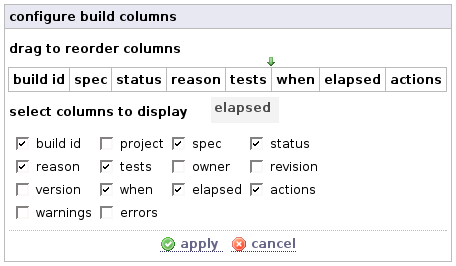
My personal favourite is a new widget to customise the columns in build results tables. These tables are used to summarise the most important build information throughout the Pulse UI. Over time, our customers have requested several new pieces of information to be shown in the tables. Adding them all for everyone would lead to information overload, not to mention the required screen real estate. The obvious solution was to make the table columns customisable. This is a prime case where a rich client-side UI is far more usable than a “click-refresh-click-refresh…” approach. The widget we came up with is simple: a bunch of checkboxes to choose the columns to show, and the ability to drag and drop the columns to reorder them:

Using it is a snap, and it just Feels Good. Everything happens client-side until you apply and the changes take effect by an AJAX-refresh of the underlying page.

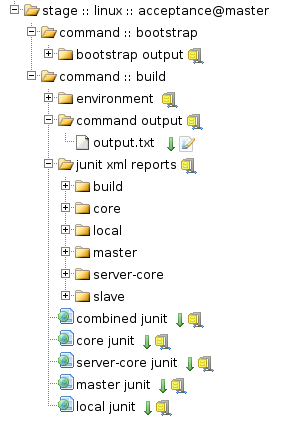
Another prime candidate for AJAXification was the views for browsing working copies and build artifacts. We already had a treeview in place for browsing directories (e.g. during the setup wizard), and with some work adapted it to these views:

I can not tell you how much faster it is to browse around using these views! The page only loads what is needed when you first hit it, and drilling down is much, much easier.

Article: Reducing the Impact of Broken Builds

Tuesday, December 5th, 2006

The “build” is the current status of any software project, and as such reflects the health, vitality and progress of the project. In this article we first review some of the impacts of a broken build. Those already familiar with the negative impacts of broken builds may wish to skip this lead in. There follows an analysis of various techniques to reduce the frequency and impact of broken builds. These techniques vary from the optimistic to the preventative, and from lightweight to quite intensive.

Read the full article at zutubi.com.

Pulse Continuous Integration Server 1.2 M3

Tuesday, December 5th, 2006

We just keep on punching out the milestones on 1.2 ;) . New features in this puppy include:

  • Customisable columns: customise build tables with drag and drop.
  • Manual release support: configure Pulse to prompt for release build properties
  • Post stage actions: hook in after each agent build to cleanup/reboot agents.
  • P4Web support: built in linking to P4Web.
  • LDAP group integration: manage permissions through LDAP
  • Broken since support for tests: differentiate new and existing test failures.
  • Executable projects: run custom build scripts without dropping down to XML.

See the early access page for M3 packages and full details.

Get More Out Of Your Continuous Integration Server With Personal Builds

Friday, November 17th, 2006

The headline new feature in Pulse 1.2 is personal builds. A personal build is a build of the current state of your working copy on the Pulse server. This allows you to test your changes before you commit them to version control. The most obvious advantage of this is that you don’t have to taint your shared source base with untested code to get a CI build. You test first, then commit when you are happy. However, there are also some less obvious advantages:

  • Multiplatform testing: Pulse supports distributing a build across multiple agents in parallel. This allows you to easily test on multiple platforms. Couple this with personal builds, and you can easily test code on platforms other than your preferred development platform while you develop. No need to struggle with slow builds over a networked file system, or to manually move the code about to test.
  • More efficient resource usage: you can submit a personal build to your Pulse build farm and still have your development machine free for other tasks. You can also make use of free developer machines as Pulse agents, but that is for another post :) .
  • Full reporting: just like every other build, Pulse extracts and reports interesting information for personal builds via a rich web interface. This beats digging through hundreds of lines of build logs and scratching up test reports to find the relevant info. Pulse can also be configured to send you notifications when personal builds complete, just like a CI build. You can even customise both the information Pulse extracts from the logs and the format of the notification messages.
  • Build history: Pulse will remember your recent personal builds (as many as you choose) and keep the results available for browsing. This makes it possible to refer back to an earlier issue without scrolling frantically in your console buffer (if you’re lucky enough to have the output at all!).

Personal builds are just one way in which we are making Pulse do more than your regular continuous integration server. From the start, we have seen Pulse as not just a server that sits on the sideline, but as a tool that you can leverage during every day development. This is why we have a strong focus on the developer in Pulse: every developer has their own account with a configurable dashboard and very flexible notification settings. Adding personal builds to the mix expands on what you can do with Pulse as you develop, and it is just one of a suite of tools we have or plan to add to Pulse in the near future.

Anyhow, I hope I’ve piqued your interest in the idea. If so, check out the Early Access Page for Pulse 1.2, and enjoy!